在上一篇博文中,介绍了永续合约资金费率套利的原理。任何一个交易策略如果想要长期使用,必须挖掘和分析它在不同行情下的表现,而这一过程离不开历史数据的收集。
本文将重点介绍如何收集资金费率的历史数据。
交易所页面
资金费率是由每家交易所计算的,因此,最先想到的数据来源自然是交易所本身。
早期,交易所只提供最新的资金费率,过期数据无法获取。然而,随着资金费率套利的增多,交易所开始提供全量或近几个月的资金费率数据供用户下载。
如下图所示,Binance交易页实时计算的下一次资金费率:
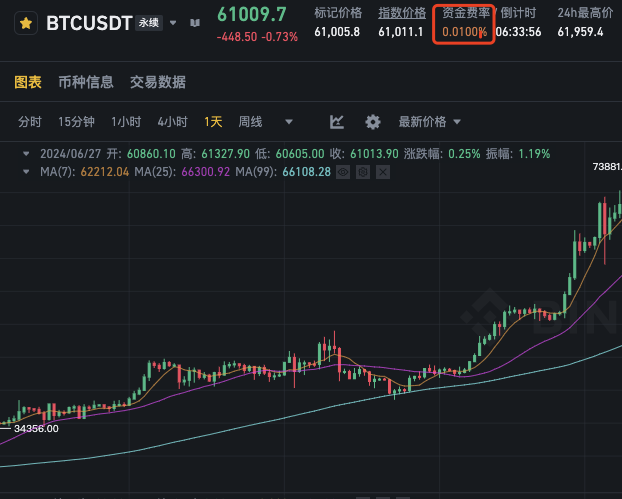
这个值并不是固定的,随着行情变化会有所波动。它只是预测下一次的资金费率,而非历史数据。
那么如何获取历史数据呢?
以Binance为例,它提供了一个可以查看和下载全量资金费率历史数据的页面,访问 Funding Rate History。
如下图所示,只需点击右上角的 “Save as CSV” 即可下载所有数据:
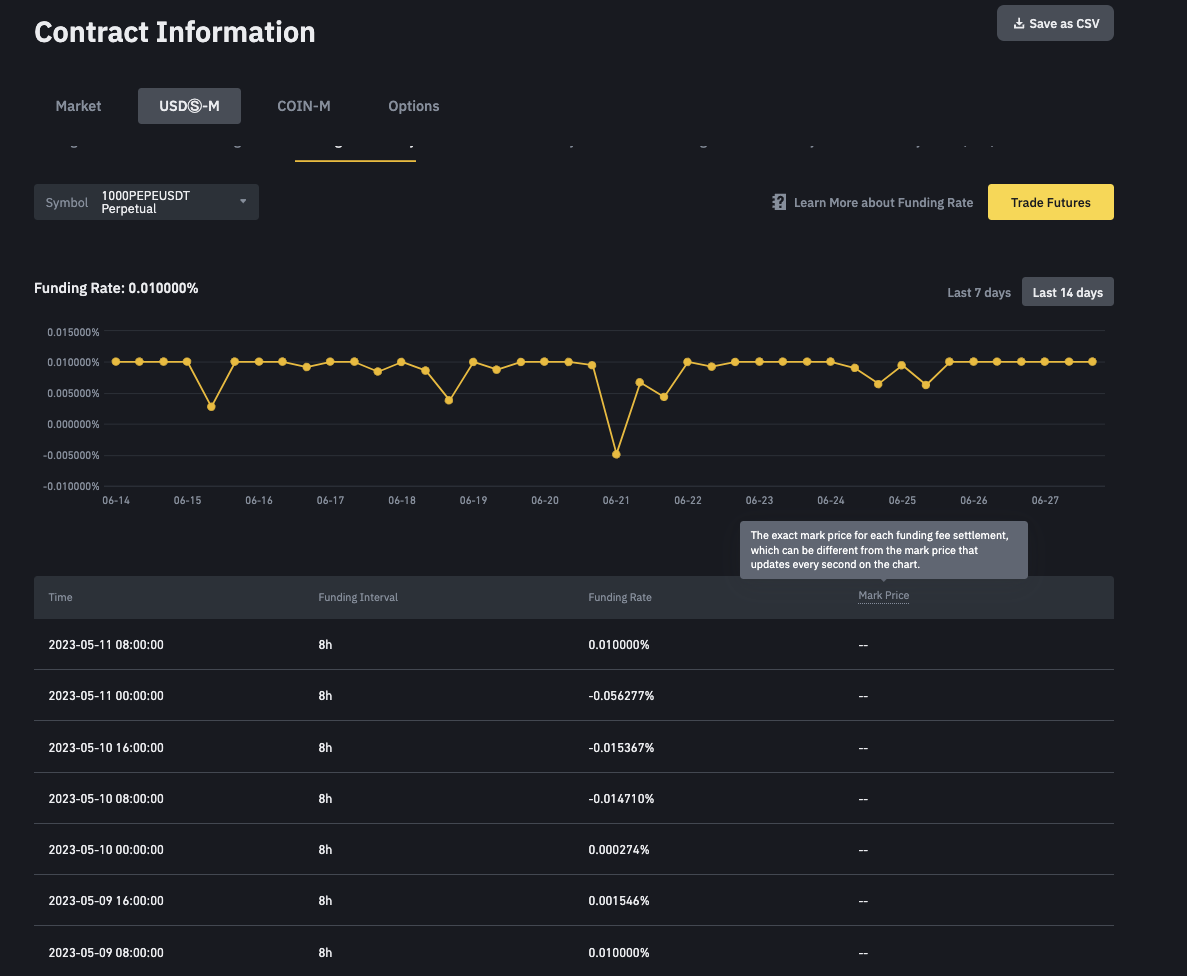
其他交易所的获取方式也基本一致,如Bybit和OKX,它们也提供了类似的历史资金费率页面。
- Bybit – Funding Rate History,Bybit和Binance一样,提供全量数据下载。
- OKX – Funding Rate History,OKX只提供近三个月的数据,无法下载全量数据,这是一个缺点。
对于数据分析而言,从页面下载已经足够。如果是实盘交易,则需要借助交易所的API,实时分析历史数据和获取下一次的资金费率。
交易所的API接口
接下来介绍如何通过API获取资金费率。这需要你至少了解一种编程语言,如Python,并且能够调用交易所API。
以下是三个主流交易所的资金费率API文档:
- Binance Coin-M – Funding Rate History API
- Binance USDⓈ-M – Funding Rate History API
- Bybit – Funding Rate History API
- OKX – Funding Rate History API
Binance的正向合约和反向合约需要分别调用不同的API,这是对接时要注意的点。为了简化API对接,我将使用Python的第三方包ccxt来连接不同的交易所。
安装(已有 Python 环境):
| pip install ccxt |
只需通过ccxt提供的fetch_funding_rate_history方法调用上述API文档中的接口。以下是使用API从Binance下载资金费率数据,以永续合约BTCUSDT为例。
| import ccxt binance = ccxt.binanceusdm() funding_rates = binance.fetch_funding_rate_history(symbol="BTCUSDT") print(funding_rates) |
输出数据包含多个时间点的资金费率数组,如下所示:
| [ { 'info': {'symbol': 'BTCUSDT', 'fundingTime': '1716624000000', 'fundingRate': '0.00010000', 'markPrice': '68775.00000000'}, 'symbol': 'BTC/USDT:USDT', 'fundingRate': 0.0001, 'timestamp': 1716624000000, 'datetime': '2024-05-25T08:00:00.000Z' }, { 'info': {'symbol': 'BTCUSDT', 'fundingTime': '1716652800000', 'fundingRate': '0.00010000', 'markPrice': '68945.95530496'}, 'symbol': 'BTC/USDT:USDT', 'fundingRate': 0.0001, 'timestamp': 1716652800000, 'datetime': '2024-05-25T16:00:00.000Z' }, ... ] |
info 字段是API返回的原始信息,其他字段是ccxt整合不同交易所后生成的通用字段。
仔细观察程序打印结果,你会发现API返回的并非全量数据。由于API每次返回的数据量有限,需要多次循环才能获取全量数据。
我将这个过程封装为一个函数,代码如下:
| def binance_fetch_all_funding_rate_history(symbol, limit=100): all_funding_rates = [] since = None end = None if not symbol.endswith("USD"): binance = ccxt.binanceusdm() else: binance = ccxt.binancecoinm() while True: funding_rates = binance.fetch_funding_rate_history( symbol, since=since, limit=limit, params={"endTime": end} ) if not funding_rates: break all_funding_rates = funding_rates + all_funding_rates oldest_timestamp = funding_rates[0]["timestamp"] end = oldest_timestamp - 1 since = oldest_timestamp - limit * 8 * 3600000 time.sleep(0.2) # 防止触发频率限制 return all_funding_rates |
现在,只需调用binance_fetch_all_funding_rate_history函数获取数据并将其保存即可。
| import pandas as pd def main(): funding_rates = binance_fetch_all_funding_rate_history("BTCUSDT") data = pd.DataFrame(funding_rates) data[["datetime", "fundingRate"]].to_csv("binance_BTCUSDT.csv") if __name__ == "__main__": main() |
这里保存了两个重要字段:datetime和fundingRate,并将其保存为名为binance_BTCUSDT.csv的文件。
Bybit和OKX的实现代码可查看我的Github Gist – 资金费率下载。需要提醒的是,OKX无论是从页面还是通过API下载,都只能获得最近三个月的数据。
在实盘场景下,查看交易所最近预测的资金费率,也可通过ccxt直接的方法获取。
| import ccxt proxies = {} binance = ccxt.binanceusdm({"proxies": proxies}) funding_rate = binance.fetch_funding_rate(symbol="BTCUSDT") print(funding_rate) |
输出结果如下:
| { 'info': {'symbol': 'BTCUSDT', 'markPrice': '61979.80000000', 'indexPrice': '61987.25595745', 'estimatedSettlePrice': '61972.26180915', 'lastFundingRate': '0.00010000', 'interestRate': '0.00010000', 'nextFundingTime': '1719792000000', 'time': '1719776533000'}, 'symbol': 'BTC/USDT:USDT', 'markPrice': 61979.8, 'indexPrice': 61987.25595745, 'interestRate': 0.0001, 'estimatedSettlePrice': 61972.26180915, 'timestamp': 1719776533000, 'datetime': '2024-06-30T19:42:13.000Z', 'fundingRate': 0.0001, 'fundingTimestamp': 1719792000000, 'fundingDatetime': '2024-07-01T00:00:00.000Z', 'nextFundingRate': None, 'nextFundingTimestamp': None, 'nextFundingDatetime': None, 'previousFundingRate': None, 'previousFundingTimestamp': None, 'previousFundingDatetime': None } |
有了这些基础数据,就可以进入下一步,分析资金费率的套利空间。
第三方平台
如果你不想自己整理数据,也有一些三方平台,如Coinglass,提供了资金费率分析的工具,聚合了大部分主流交易所的数据,并提供了一些简单对比分析图表。
访问地址:Funding Rate。
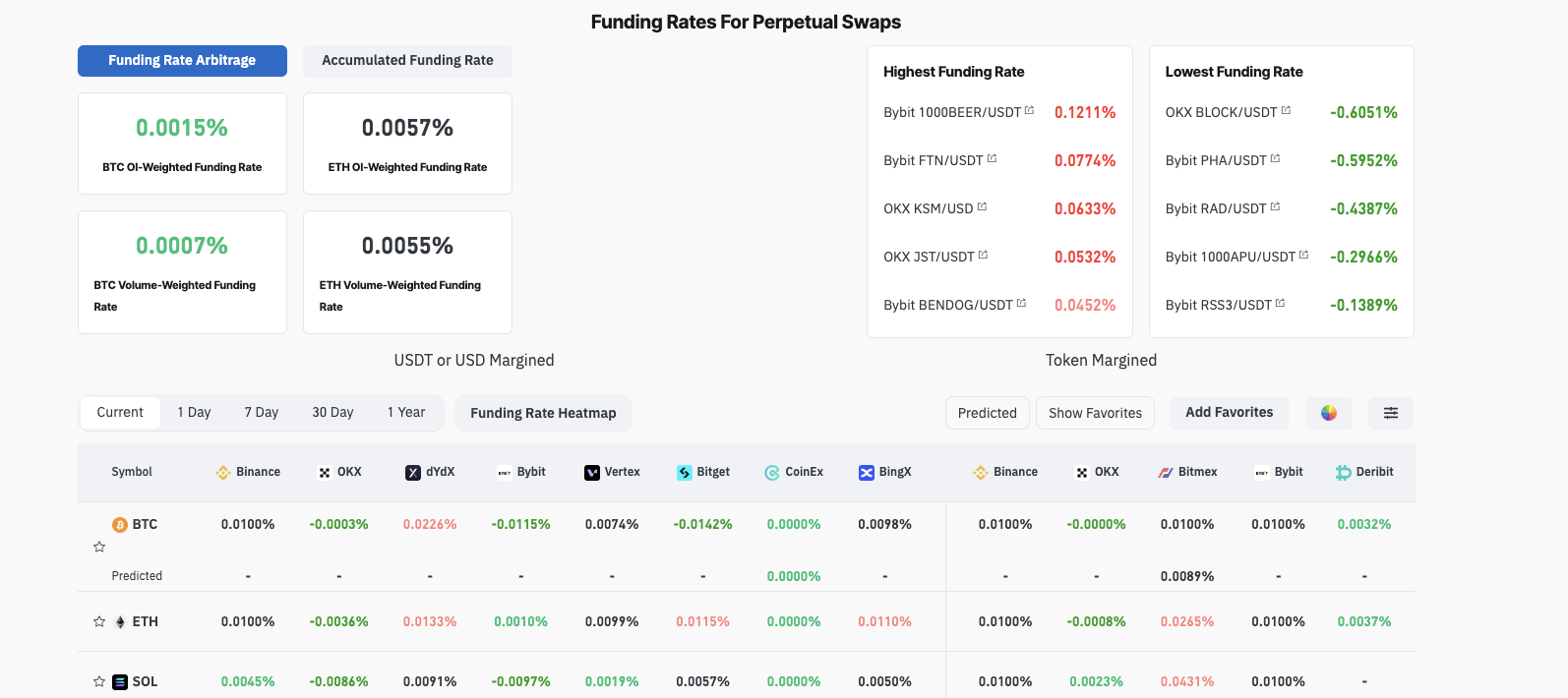
如果你不需要深入分析甚至甚至是回测,这或许是一个不错的选择。
本文来源于 POLOXUE’s BLOG,地址: 永续合约资金费率数据搜集
01 Jul 2024
https://www.poloxue.com/posts/2024-06-27-collect-the-funding-rate-data/